Home About Me My Store Freebies Pinterest Facebook Instagram TeachersPayTeachers Email Twitter Image Map

Distance Learning: Daily Schedule


I am about to enter my 7th week of distance learning. I remember the first week or two working very long hours; more than I worked as a first year teacher. Now that things have settled in a bit and there is a new normal, my schedule is much more manageable. Although I still feel like I am on a hamster wheel, I am better able to control the speed, and I don't fall off as often!

My official hours are from 8AM - 3PM. If you've been in this career for any length of time, you know that we teachers rarely stick to our contract hours. Nights and weekends are not our own. It can take herculean strength to not check email or grade work outside of contract hours. It was a big enough challenge when I physically drove to my classroom - but now my classroom is my dining room table. 

The instant accessibility to resources, materials, cloud storage, etc... makes it very tempting to do "just one more thing" before shutting down for the night. Plus, with our students experiencing the same situation, they may not be adhering to a morning/daytime schedule. They may be logging in for the first time after my contract hours have ended. So, it's a delicate balance between home and school.

You can read some quick tips to manage your professional and personal responsibilities here: Distance Learning: A Teachable Moment

At this point, this is how a typical day looks for this distance learning teacher:


8:00 AM - Morning Login


To be honest, I might fire up my computer as soon as I brew a cup of coffee; well before 8 am. Once my morning jolt gets flowing, I am ready to go.

I find a "Today in History" factoid that I am going to share with my students during the live morning announcements at 9:00 am. I also find a short video (3-5 minutes) that elaborates on the Event of the Day and I link it into our social section of Google Classroom (The Fourth Grade Forum). I also post a question in the Forum for students to answer or ask them to share an additional fact they have learned about the subject.

I select an event that is related to the curriculum we are working on or something connected to pop culture. I always keep it "light" and try to have fun with this part of the day. 

You can find some great Today in History Factoids here: On This Day 

I prepare all of my materials and add any notes I might need to my list for the announcements. Then, I send a text message to families reminding them about morning announcements at 9.

I also double check that all assignments for the day have been linked properly in Google Classroom.


Getting my charts and announcements list ready!


9:00 AM - Live Morning Announcements


Once my grandfather clock has stopped chiming for the nine o'clock hour - it's show time. I immediately start live morning announcements. I won't say it was easy to start, or that I don't have a bit of nervous energy every time I go live, but it does get easier every day.

After announcements I immediately copy and paste the direct link into our classroom's chat messaging (through a District provided platform) for the students to access the announcements if they missed the live stream.


9:30 AM - Daily Bonus Zoom


For a couple of weeks we have had bonus Zooms. Each day we invite students to click in and learn the 5 Ws of a given topic. Each week has a theme. Last week the theme was the 3 branches of government. The week before, we talked about notable NYS places during the Revolutionary War. This week the topic will be mathematicians.

We have a bit of traffic clicking in during this time of the day. We weren't sure if students would have interest, but after a few weeks, the Bonus Zooms seem to be a hit. So, for now, we will keep them going.


10:30 AM - Social Zoom (M-W-F)


This segment of the day is designated for some social face to face interaction and light conversation. We tell jokes, share stories, and simply have fun. Structuring these meetups is important to avoid awkward silence. Last week we had Show and Tell split between Monday and Wednesday. On Friday we had an 80s-themed Dance Party. This week coming up we are going to have a 20 Questions Guess Who on Monday and Wednesday.

For more ideas about what to do during a virtual meetup click below:
Distance Learning: Virtual Meetup Ideas


80s-themed Zoom Dance Party!

Best. Team. Ever.


11:00 AM - Online Support


After the social Zoom I am online supporting students and families. I am grateful for the platforms we have in place. I love being able to watch my students navigate on their Chromebooks and make sure they are getting into the correct Slide, Doc, or Form.

The students have been great about touching base for the day or asking for help when needed. Because of the unique structure of my team, we each have access to the others' classes and we support one another throughout the day. If a student has a question I can't answer, I simply contact the teacher who assigned the work and we get it sorted out. 

This part of the day is also spent giving students feedback, checking for task completion, and calling families. In reality, we are contacting and supporting families all day every day. But, this is definitely the busiest part of the day for online support.


1:00 PM - Team Meeting


We meet online with our admin once a week to discuss concerns or plans moving forward. The afternoon is also the time when my team and I do our own meeting. We oftentimes troubleshoot upcoming plans or discuss how to improve on what we have been doing thus far. 


2:00 PM - Prep for Tomorrow


I usually spend the last hour of my contract day preparing for the next day. I might print out materials for demonstration during live announcements the next morning (for example: Task Charts for the students or the schedules for Spirit Week and Zoom meetings) or finalize the instructions and links for upcoming assignments. I don't always finish up exactly at 3:00 pm. But, it is a relief when I hear the clock chime!

Nights and Weekends


Things that are not completed during the contract day get pushed to nights and weekends. It is fascinating how the concept of time has shifted during distance learning. I have found a better balance between home and school compared to the first 2 weeks. I have also discovered that as I become more skilled in one aspect of this new normal, it seems there is something beyond I will need to learn and hone.

I am so grateful for my team. I have the best teammates who are there for me at a moment's notice. We have always worked well together (16 years will do that for a team), but under these circumstances our capacity for teamwork and problem-solving has never been more evident. Because of them I am able to stay on the hamster wheel, take a break, and get back on the next day.

When broken down in this format, this daily schedule might not look like much. However, as the saying goes, looks can be deceiving. I have tried to explain to people why distance learning is more tiring or why simple tasks take so much longer. My explanations are severely lacking. I guess it's the same scenario as when we work from the classroom: unless you are doing this job, you have no idea what it is like. It cannot be explained, only experienced.

Keep those hamster wheels turning, folks. We got this.


Distance Learning: Virtual Meetup Ideas


Distance learning is starting to shape up. As the days and weeks go by we continue to learn what works and what doesn’t. It is the ultimate lesson plan that requires on the spot switch ups and changes as it unfolds before us each hour every day.

So, what are we learning about Video Meetups? Do you Zoom? Are you using Google Meet or Classroom Meet? How does it work for you? What are the pros and cons?

When you are teaching from home there are so many platforms to choose from; but not one platform is perfect! My team has used Google Meet (standard and Classroom) and Zoom for video meetups. For now, we like Zoom. Next week, I might change my mind…

As of today there are some clear pros and cons. But, tech is moving at the speed of light, so some of these may not apply as soon as I click the "publish" button. Also, these pro/con lists compare Zoom to Google CLASSROOM Meet; not standard Google Meet. There are a few more security measures with CLASSROOM Meets. Lastly, Zoom is a platform designed for video conferencing. While Google is attempting to "get up to speed" with what teachers need right now, it simply (understandably) does not have the same bells and whistles as Zoom.

Pros with Zoom:
  • Secure
  • Virtual Background Fun
  • Screen Share
  • Can Invite Non-District (student teachers) to join
  • Students Cannot Re-enter Once the Meeting is Over
  • Co-host Capabilities
  • Smooth Mute/Unmute Controls
  • Standard Grid Display Option
Cons with Zoom:
  • 40 Minute Limit* (teachers are offered free unlimited)
  • Audio/Video Can be Unstable/Frustrating
  • Requires Providing a Clickable Link in Google Classroom or Providing the Credentials

Pros with Google CLASSROOM Meet:
  • Audio/Video Smooth
  • Easy One Click Entry Within the Classroom Header
  • Students Cannot Reenter
  • Screen Share
  • Secure
Cons with Google CLASSROOM Meet:
  • No Virtual Backgrounds
  • Grid Display Requires Extension
  • No Outsiders Allowed
  • Mute/Unmute Controls Cannot Be Controlled by Host
  • No Co-Host Option

GET READY FOR A MEETUP!

We have noticed that if we aren’t prepared with a little material all that happens is small talk and staring at each other for 30 minutes. To help you avoid the stare downs, here is a list of activities (some are quick and others require a little prep work) to help you have a successful virtual meetup.

CHARADES

Who doesn’t love to perform funny actions in order to make others laugh? Kids love to have permission to be silly especially in front of their peers. Having the teacher start gives the students directions and expectations for what they will be doing next. During our meetings I have the kids raise their hands to interject into conversations so this is a great cueing system for games as well. The student that guesses correctly gets to perform the next charade.

SHARE A JOKE

This has been one of our favorites since we started meeting. I love to find content related jokes that are silly or gets them thinking! I have also used seasonal jokes. (During Holiday Spirit Week I coordinated the jokes with the holiday of the day.) The kids can easily bring a joke or two to share as well. A joke can bring smiles to any conversation.

WOULD YOU RATHER QUESTIONS

The kids absolutely love when we post these on our classroom pages. Bringing these into the chats is a great way to get all of the kids talking. There are always a few kids that just observe and never really say much. This encourages them to answer quickly without too much attention brought to them.

HOW TO ACTIVITY

Using drawing or Origami, the students love to model their art work by following your directions. Keeping the activity and directions simple will help with keeping success high and frustration low. Having the students share their creations after is a great way to use your meetup time wisely.

GUESS WHO

Dress as a famous person and host a Guess Who session. Students get to ask 20 yes/no questions to determine who you are. If you are really clever, invite a guest Guess Who person to the meeting!

SHOW AND TELL

This time-honored favorite will be a hit. Ask students to bring an item to the meeting. If needed, break up the meeting into more than one day, or plan for small groups so that every student has an opportunity to share.

SPIRIT WEAR

Invite students to wear a certain item associated with a holiday or theme. Have them dress their pet, bring a sibling, or twinsie with someone. Because of the visual nature of meetups, use the format to encourage your students to engage in the visual aspect of the meetup even if they are reluctant to share vocally.


Our week of holiday themes!

PLAY BINGO

Give students words throughout the week and have them assemble a bingo board. Play on Friday! You could "drop" bingo board words during live morning announcements, within instructions for particular assignments, or during "Bonus Zooms". Keep the students hunting throughout the week to fill their board as much as possible! If you use Zoom, switch out your virtual background throughout the week and have the location be bingo words.


Sometimes it's the mouse, sometimes it's the wizards.


SCAVENGER HUNT

Create a list of item students need to find. For instance: a chapter book, a stuffed toy, a red coloring item, a refrigerator magnet, a box of pasta, one sock, something soft, a spring themed item. Have fun with it. At the end of the hunt, share out!


FIND SOMEONE WHO

Instead of finding "someone", find "something". This is similar to a scavenger hunt but with a level up on complexity. If your students are learning a specific content, connect that content to the item they need to find. For instance, "Find a liquid." "Find a producer." "Find something made from cotton."


PLAY HANGMAN

This classroom favorite can work well in a virtual meetup. Use a variety of words. Some that are seasonal, some that are content driven.


GIVE YOURSELF GRACE

Sometimes you have an awesome virtual meetup. Sometimes you're on the struggle bus with no stop in sight. Don't give up! It will get easier. Keep your expectations at a minimum and have fun. Your students won't mind if the meetup is a hot mess the entire time; they recognize that we are all trying our best. Ask for their advice- sometimes students come up with the best ideas!


This meetup started out on the struggle bus...but it corrected course later on!

There are a lot of unknowns and unstable factors to any video meetup. But there is no question that it helps keep us all connected and gives us an avenue of some much needed facetime fun and laughter. Video meetups can be used to deliver instruction. But my team likes to use them to deliver something even more important: laughter. Have fun, everyone.


Distance Learning: Engaging Students


There is no question that distance learning has teachers digging into their bag of tricks. The biggest difference is that we now need to engage students using a digital classroom without the benefit of being in the same physical space. You may be reaching into your top hat and coming up empty. It's OK. You're not the only one.

In the past couple of weeks of foraging through this new way of educating and engaging students I have found the following tricks to be helpful:

Morning Announcements


If you have a Google account, you have a YouTube channel. It can take 24 hours to set your channel up, but it is an excellent way to get your students to log in and engage in the day's activities and assignments. There is a small learning curve, but the end result is worth the effort. 

There is a bit of nervous energy with doing anything on video. It exponentially grows when doing it live. Take a breath and do it anyway. Your kids won't care. Be human, and let them know you're human. My first live, I made it clear that I had no idea what was going on and I was trying to learn the platform. They were very understanding. We can only learn through experimenting. Sometimes it's a hit and sometimes it's a miss. But, it's all good and it can only get better.

I go live every day at 9:00 AM for the morning announcements. Before I go live, I send a reminder to my families via a digital communication tool between school and home. (For example: Class Tag or Class Dojo.) I make sure to share the direct link to my channel.

The first couple of announcements weren't that great. I wasn't 100% confident in what I was doing. I was sleep deprived and mentally exhausted. I was scrambling to come up with what kind of content needed to be broadcast. But, it was (and continues to be) worth it. 


First Live: no make up, messy bun. But, I got it done!

At this point, morning announcements look something like this:
I go over the "Task Chart of the Day". I remind them where to find assignments and links in their Google Classroom. I also answer questions that may have been broad-based the day before.

I also give students and families updates on any changes or district-wide announcements. This can be especially helpful for families who have children in other buildings and need to hear the information from a person rather than a written memo.

Going over the day's agenda give students a launch point for the day. If students do not watch the announcements when I am live, they have the option to watch a replay when they login for the day. 

Spirit Weeks! We have done one each week and plan to do another one this week. My goal is to keep Spirit Weeks going throughout distance learning. It gives the students something to look forward to, my team loves the pictures and engagement, plus I use the themes to dress for the morning announcements!

Before I end the announcements I do a "Today in History" fun fact. My daughter has been helping with that portion of the announcements. There is a bit of time and research to get this segment of the announcements organized, but again, it's worth the time and effort. (Keep reading to see why...)

When I am done with announcements, I save the recording to my channel so students and families can replay later. 

GoGuardian


After announcements, I head over to the platform my district has in place to chat and troubleshoot with students. We use GoGuardian. It allows me to see everyone's computer screen as well as offers chat messaging. There are other facets to GoGuardian that work well for teachers and administrators. But, from the teacher perspective, the ability to see screens and chat in real-time is immeasurable.

When I get into GoGuardian I send an announcement to the whole class that I am there. I let them know if they have questions to feel free to ask. Oftentimes, students will respond back with a "Good Morning", or a "Hi, Mrs. Fritcher!". I make an attempt to reply back every time someone offers a friendly greeting even if it is a simple ":)". I had to explain the sideways smiley response a couple weeks ago; the students had no idea what it was! 

The chat option allows me to help students (and sometimes parents) while they have their screen open. Whether it is a parent or the student, it is a comfort and relief to know that I can navigate with them in real-time to make sure they are getting through the material.

Fourth Grade Forum


My team added a social classroom into our Google Classroom. We named it the Fourth Grade Forum. This is the social place. It's where we share photos of students doing projects, pics of students participating in Spirit Wear, offer "This or That" questions, post Today in History fun facts and/or trivia.

The Forum has become a surrogate for the lunch room and playground. We stick to the same rules as we would in any school space. But, it is wonderful to have a spot that isn't driven by instruction. Many times I have noticed students going into the Forum immediately after morning announcements (and sometimes before!). It's the only place students have posting privileges. We do monitor the posts and have deleted some. Students will adjust to the rules quickly if the expectations are set from the beginning.

To keep the conversation going, I try to post a challenge trivia question related to the Today in History fun fact. I let them know during the morning announcements to head over to the Forum to answer the trivia question. If I find an interesting YouTube link that elaborates on the fun fact, I link it to the question. Friday's trivia question was about the Pony Express. I was able to find a short 4 minute video. If students watched the video, they were able to answer the trivia question. Or, if they did a Google search, they could answer the question as well.


On any given morning, my kitchen table looks like a trash heap.

ZOOM


It seems as though everyone is either in Google Meet or Zoom. We Zoom. My students love it. With that being said, it's not that great for delivering instruction. After a week of hits and misses with internet connectivity, my team decided to use Zoom as a social tool (sprinkled with content). We will be delivering the bulk of instruction through screencasts and YouTube links.

The value in video conferencing is the face-to-face; the instant connections of speaking and listening to one another. Our fourth grade has put together a small group Zoom schedule that will give everyone a change to connect and speak Monday through Thursday. On Friday, we will be holding content-specific Zooms so students can chat and ask questions about what we have been learning. We are still hammering out details, but it looks promising!

CONNECT, CONNECT, CONNECT


The more you can funnel students using times and places, the more structure the students will have, the more engaged they will be. My students and families can expect announcements at 9:00 every morning. It helps them with a sense of order and normalcy. It's a small piece of stability during a very unstable time. 

Guide them to the spaces they will need to visit. Let them know where they can find you. Include information, stories, and links to things that serve no curricular benefit but are critical in keeping them connected to you. Make your digital classroom as welcoming a space as your physical classroom.

Just as our physical classrooms become the safe havens, you can offer the same with your digital classroom. Don't get so deep into delivering instruction you lose sight of a greater purpose you serve in the lives of some of your students. 

Don't get discouraged if something doesn't go as well as planned. Give yourself grace if you link something incorrectly or you forget to post an assignment. We are all human. Students will understand. They are happy with you just showing up.

We are being asked to dig deeper into our bag of tricks than ever before. I am confident we can do it. Now, has anyone seen my rabbit?


Distance Learning: A Teachable Moment


I am a teacher. I've been honing my craft for over 20 years. There isn't much that can shake me up. No matter how disastrous a lesson becomes once delivery begins, I can dig into my tool kit, hammer out something useful, and find a teachable moment. Generally speaking, teachable moments cannot be planned for and can happen at any point in a lesson. When recognized, these small moments of opportunity can be seized upon and used to offer greater insight to our students. They can be shaped to take the worse situations or missteps and craft them into useful knowledge our students can use as they grow into young adults.

Right now, we are living in a teachable moment.


When this school year began one of my goals was to complete the year in my temporary classroom (due to a construction project) and head back to my home school for the following year and beyond. At this point, I have scrapped that plan, hammered out what is useful, and have realigned my goals.

I went back to basics. What are the minimum requirements needed to get through this? How can I scale back all the superfluous nonsense and get to the core of what is important? 

My goals the past two weeks.
1. Deliver Instruction
2. Keep My Family Healthy

You may have to scrap your lesson plan as well. With distance learning and digital platforms being the main modes of communication and instruction, I offer the following pearls of wisdom to help you navigate this new normal and get back to basics.

FOR YOUR STUDENTS AND THEIR FAMILIES

We are teachers. We are wired to help our students through any situation that arises. Our current situation is no different. However, there are small things you can do to keep things focused and streamlined for everyone. 

Connect to Your Students

We have lost the daily greeting at the door. Create a way to connect with your students. For me, I (finally) started my YouTube channel. I used the free one included in my district Google account. Every morning I hold the Morning Announcements at 9:00 am. It gives the students a chance to see and hear me. It is also a nice way to give them a structure for starting their day as well as keeping them updated on changes in Google Classroom.

My class and I will be moving to video conferencing. I look forward to meeting as a whole group and in small groups. There is definitely some comfort in being able to interact in real time with one another. As with YouTube, it will be new for me but I am willing to go through the growing pain because I know the payout will be well worth it.

Make some phone calls. You know who isn't logging in. You know which students are going to need more support than ever before. They need to hear your voice. They need to know you are still there for them. Call them.

Use What They Already Know

Unless it is something vital (such as a video conferencing app), I highly recommend that you do not start a new platform with your students. There is a lot of frustration and confusion for both students and families. Another new "thing" could push people to logoff and stay off. Stick to what your students are most comfortable with right now. If it is a website that requires credentials, have a master list ready. It doesn't matter if your students have been using it all year; someone will ask for their password. Promise.

Once everyone has had some time to adjust, then maybe you can add in something new. Also, if you are confident that you're delivering instruction digitally for only a couple of weeks, consider whether it is worth the effort and frustration of introducing and navigating your class through a new platform. The more familiar you can keep things, the easier it will be for everybody.

Practice the 24 Hour Rule

There may come a time when a student or parent makes a hurtful comment. Let it go. For the vast majority of hurtful comments directed at you, you are experiencing the brunt of people's frustrations over a situation they cannot control. The unknown and the disruption to their family schedules has some people working with a very short fuse. Don't ignite it. 

For some, that means re-focusing the discussion in a helpful, productive way. For others, it means you don't respond to the email or message. The 24 hour rule before pushing "send" needs to be in play more than ever before. 

FOR YOU

We are teachers. But we are parents and spouses and caregivers too. Do not lose sight of the other hats you wear. And, don't lose sight of you.

Stick to Your Official Day and Office Hours

If your district has determined work hours and/or office hours, stick to those times. It is important to set a precedent for the students and families. 

If you are expected to work until 4:00 pm and a student logs in at 4:20 pm, it is not your responsibility to stay online and help. Students and families need to know the times you are available and respect those boundaries.

Of course, there are exceptions. As a professional, you can determine the individual needs of your students.

I know teachers work nights and weekends to complete tasks that cannot be done during contractual hours. This is not the same situation. Your brain will need a break. Your eyes will need a break. 

The past two weeks have been the most exhausting two weeks I have ever taught; and we're just getting started.

Set clear boundaries now and get into a habit of shutting down your day at the designated time.

Clean Something

Spring cleaning has taken on a whole new meaning. I was pleasantly surprised by the feelings of accomplishment and completion as I checked off household chores. Folding laundry, changing sheets, dusting, vacuuming...they all helped me feel some closure at a time when there is no end in sight. 

I spent my first weekend getting my house in order. I couldn't control what was going on in the world of education but I could make sure my house was organized and refreshed for the long haul that we face with social distancing and self-quarantine.

We don't know when this will be over. But, I do know my laundry is caught up and the bathrooms are clean. The small chores I finish help me to get up and put on my Teacher Hat each morning. It clears my head to stay focused on school responsibilities. 

Get Moving

Fresh air does wonders. After a day of sitting and working on a computer screen, your body needs a change. The movement, the air, (hopefully the sun) will give you a break from the monotony of being seated and typing all day. 

Elementary teachers are built to move around during the day. We are up and down, we are up front and in the back, we rarely sit. Make sure you remind your body that although we may need to be seated for longer stretches of time than it's used to, we will get it moving again. Plus, it helps get that step count up!

If you don't head outside, find other ways to move. Create an avenue to get your blood moving and keep your muscles and joints from getting stiff. 

It's OK to Cry

I was pedal to the medal the first week. I had described to a colleague that I felt and looked like I had been on a 3-day bender. I was working from before the sun rose into the darkest hours of the night. By Friday, I had an emotional breakdown. I sat in my kitchen sobbing by myself trying to grapple the emotional and physical turmoil I was going through. I have had emotional moments in education. This was no comparison. I had been holding my emotions in all week and the reality came crashing down in a deluge of frustration, sadness, anger, uncertainty, worry...all of it.

After a few minutes of ugly crying and sobbing, as well as some comfort from my pup, I felt better. It felt cathartic to cry. I didn't realize how much I had been holding in. Your emotions will find their way out. Don't hold them in. Let them out. Own it for a few minutes. Then, wipe your face and get back to the task at hand.

Find Emotional Balance

So, how to I keep emotions in check? I find my funny to balance out the sadness. I had been wanting to binge The Office for a couple of years. I admit that I had not seen a single episode although I knew a lot of the jokes and memes associated with the show. I decided now was the time to connect all the dots. Once my day is over, I watch a few episodes and laugh. The relief has been good for me. 

Find the things that bring you balance. Engage in the activities that give you peace and center your soul. That could mean reading, crafting, video chatting with people, bathtub soaks, exercise, puzzles. Whatever you need to stay in a positive mindset, do it. Make it a priority. It will help balance out the negative.


Our Teachable Moment


We are teachers. We are built for adapting to the unknown. We are the masters of flying by the seats of our pants. We can take a disaster of a lesson plan that looked good on paper and use our tools to turn it into the most memorable teachable moment for our students. In fact, that's a bit of what we're doing right now. 

Education has never looked like this. This isn't something that we planned for or could predict; but we are doing it. So grab your tool kit and get your hammers ready.

We are teachers. And this is our teachable moment. 


Lice at School and Home

lice elementary school

Lice

There is no other word that can strike fear in the heart of a teacher. Sure, we worry about catching the flu, the stomach bug, and any other illness that can be passed. We wash our hands, use our smelly hand sanitizers, and remind students not to cough or sneeze directly in our face. After 20 years I’ve built up quite an immune system, so I shrug off the panic when the latest virus makes its way around the building or community. Plus, I wash my hands constantly. I’ve got a solid M.O. for keeping the germs out of my system.

But despite all the precautions we make as educators, nothing prepares us for the day we start to scratch our heads and it occurs to us it’s more than just a little dry scalp…

The Following Is What My Teammate Experienced With Head Lice...

Last June, I attended an end of the year event where many of our students participated. It was so great to see them perform. At the end I felt like the Belle of the Ball, all the girls wanted to take pictures with me and hug me. I was warmed by all the love I was getting. Little did I know they were sharing more than just love.

A few days later, I was grocery shopping and my head started itching in a way that I had never felt - like in all 43 years of my life! I kept it under my hat - a literal hat - all day long. Monday morning I rushed into school and told my teammate what I was feeling.

She told me that she would take a look. Having lived through this nightmare the summer before with her daughter, she was a certified lice whisperer! Sure enough she found a few nits. I was totally devastated. How could I have let myself be so vulnerable and allow myself to catch this?

So for the next week she picked out my hair before and after school and even on our lunch breaks. Your real friends hang around when you get lice and your even better ones help you get rid of them!

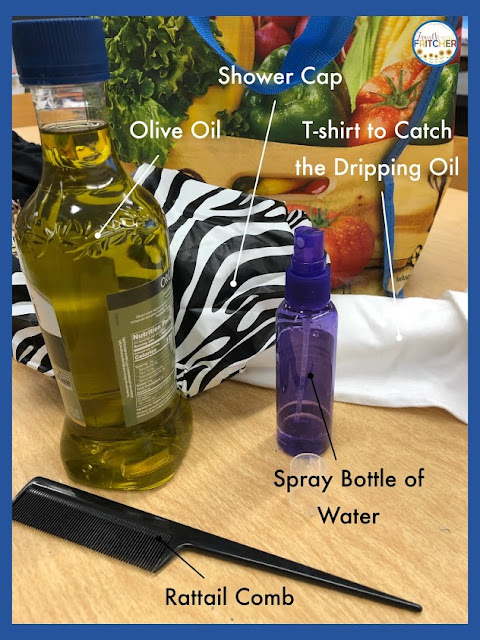
The shampoos that are available are not 100% effective and the chemicals that are in them aren’t good for your body. Against my teammate’s advice, I did try the shampoo but it didn’t do anything but get my hopes up. To combat the critters I even tried an old wives tale involving olive oil and a shower cap. That didn’t work either.
lice elementary school
Following an Old Wives Tale in hopes that it would kill the lice.
It didn't.
Despite my best efforts with daily picking and home remedies, after 10 days I was ready for the big guns! I went to a local lice “doctor” to see if they could give me the remedy I needed.

After a screening that cost me $25 I gave my consent for the treatment. They used a machine that looked like a vacuum but instead of sucking out the lice, they heated them up to death. This process lasted for about 45 minutes as they heated different sections of my hair. They claimed that the heat kills the live bugs and all 3 stages of eggs. They were very knowledgeable on the process but costly. I didn’t have the patience to wait out the life cycle of the lice and it was starting to drive me crazy! So I paid an additional $179 for them to do the treatment on me.

There was an amazing 30 day guarantee that I would get as long as everyone in my household would also get screened and treated. Can you hear the dollar signs? So now I added $50 more to my bill for their screenings just to hear they were clear. Now that my heat treatment was over, it was time to sit through them combing through each section of my hair with a special comb. They ended up finding nits and one live bug. I was so excited to be done with this nightmare. I also bought $100 in hair products. They told me that after having lice the male lice leave a pheromone on your hair up to 6 months that makes you susceptible to catching bugs again! So I got the Fairytale shampoo, conditioner, and spray. I had to keep my hair guarded. I had 2 weeks of school left!

A day went by and I thought I felt my head getting itchy again. Sure enough there were nits and I was devastated. While my teammate was picking through she thought she saw something live move. She went to grab it and it fell… we just weren’t sure where it fell. I called for my follow-up appointment that was part of the guarantee. They said, “Our heat system is only about 96% proof and when we comb you out that brings your chances up to 99%.” To my horror she then said, “You might have had some hatch but we will get them at your follow up appointment.” It seemed like I was the only one that was worried about the chance that I could still have lice after spending over $300!

So my check up appointment came and it was another $44. They said they found nothing and I have now been clean for 2 weeks. I am still staring into the mirror thinking any dash and dot could be something. I guess I will get over it just like I did with the stomach bug. But this definitely left a mark on me! I might always have PLSD: Post Lice Stress Disorder.

Advice for Lice

Like my teammate mentioned, I lived through the lice experience with my daughter. I learned quite a few things during that summer and I will now share it with you.

When I discovered my daughter had lice, I immediately resigned myself to having them too. Afterall, we had shared combs, brushes, and pillows (!). We had snuggled and slept with our heads right next to one another. There was no way I didn’t have them. By some miracle, I didn’t get lice. It was a relief that I just had to focus on getting her head clear.

I will admit that I thought I would wash my daughter’s hair with the special shampoo, comb her out, and that would be the end. Boy, was I wrong. I have a much deeper understanding of why some of our students never get rid of these pesky bugs. My two big takeaways on lice: they are harder to get than you might think and nearly impossible to get rid of.


lice elementary school

Lice Shampoos Help

But, if you have Super Bugs, like my daughter did, it’s a waste of time and money. Even after two thorough shampoos (a few days apart), she continued to have knits. To elaborate, it was summer and I had a lot more time. I was combing her hair out at least 2 times a day; very slowly and very carefully sectioning her hair, wetting it down, and combing through each section while hand-picking out the nits. Each combing took approximately 45-60 minutes. At the time, my daughter's hair was past her rear end.

lice elementary school
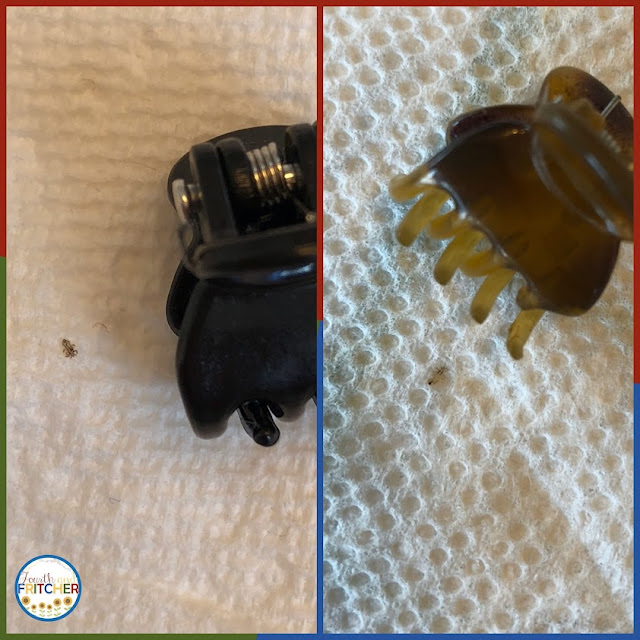
This was the one that started it all! (Her coloring is a cue that she's older and at the end of her life cycle.)
I found her after shampooing and during a second combing out. I had combed out once but wanted to be thorough. I couldn't believe I had missed her the first time.
I believed that if I could get to the end of the approximate 30 day cycle, I would have outsmarted the lice. It was an exhausting summer. On any given day I would find between 6-30 new eggs. I could not find the female (only found 2 live bugs the whole summer) and it was frustrating. As the summer wore on I knew that a new cycle was going to start and if I continued to miss the female laying the eggs, we would never get this nightmare over with. In the end, the definitive factor that got rid of the lice was heat (see tips below).
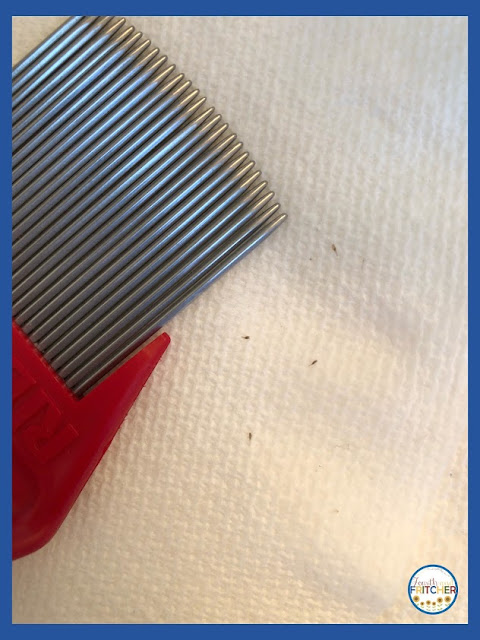
lice elementary school
Nits. I would find 6-30 at a time.
Some days I would find just 2-3 and think I was at the end of the nightmare.
But I was wrong.

lice elementary school
The TWO live bugs I found. The mini-hair clip gives you an idea of how small they truly are.


Lice Factoids

The lice cycle is approximately 30 days. One week from egg to nymph. One week from nymph to adult. 30 days as an adult. Adult lice need human blood several times a day (from a head) and will die within 48 hours if they are not on a human head.
Lice love dark and warm. The majority of the time they hang out at the base of the neck and behind the ears.

Best Tips for Preventing Lice

  • Keep hair up. Ponytails are good. Braids and buns are best.
  • Don’t hug head-to-head.
  • Do not use props in a photo booth that involve putting something on your head.
  • Do not put hats, helmets, costume masks (on display in a store) on your head. Even if you're in the Happiest Place on Earth. Just don't do it.
  • Keep your jacket away from others’. Don’t hang them next to one another or throw them in a pile. If your jacket has been in a pile next to another, do a quick check along the collar to make certain there aren’t any bugs on it before you put it on.
  • Dry hair with HIGH HEAT. In the event a bug does get on you and lays eggs, the heat will kill both.
  • Additionally, high heat works as a preventative measure as well. I’ll gamble on high heat over tea tree oil any day.

Best Tips for Getting Rid of Lice on Heads

Caveat: if you are working with an infested head, do the shampoo and use the lice comb. It’s a good start to getting things under control. Follow the directions on the container. After the initial shampoo and combing, the real work will begin.

After the initial cleaning you should check the head twice a day. I did it in the morning and in the early evening. Get your kit ready before you start combing.

My LICE KIT includes the following:
  • Rattail Comb
  • Lice Comb (occasional use)
  • Hair Clips
  • Water Bottle
  • Paper Towels
  • Blow Dryer for HIGH HEAT. Even though I was picking out my daughter's hair, I didn’t dry it afterwards. That is the key to killing the eggs and bugs. Once I started to dry her hair - and I would dry it so hot that I couldn’t touch it - the nightmare came to an end.

Also keep in mind:
  • If you can “flick” it off, it’s not an egg/nit.
  • Eggs/nits are easier to see if the hair is damp.
  • Eggs/nits are easier to see on blond/light hair. If you are working with dark hair, I highly recommend spraying the hair down. It helps with seeing the nits as well as controlling the different sections of hair.
  • Eggs/nits are sticky. You will find them near the scalp. The easiest way to get them off is to pinch the egg between two fingers and drag it down the hair. It will stay stuck on the hair unless you make certain to pull it completely off.
  • Have a paper towel ready to transfer the nits from your fingers to the towel.
  • Don’t mix the hair you’ve just combed through with hair that hasn’t been combed through. I know that sounds basic, but long hair can be a challenge; avoid mixing. Use clips to keep the hair separate and make sure lice do not have an opportunity to scurry to a darker/shaded section of hair while you’re working in another part. It happened to me. I flipped a section and once the louse was exposed to the light it scurried to a dark part. I lost the bug and was unable to find it; even though I saw exactly where it went.

Best Tips for Getting Rid of Lice in Your House (you probably don't have any but just in case)

Don’t panic on this one. I didn’t freak out and wash everything in sight. But I would recommend the following:
  • Wash all bedding.
  • Wash jackets.
  • Wash all combs, brushes, etc. and keep them separate from others’.
  • Change the infested person’s pillowcase every two days.
  • Place infected towels and clothes in a separate pile and wash separately.

Your couches and chairs are fine. Your pets are fine, too. You don’t need to do anything special for these. Yes, they sell lice spray. No, it doesn’t really do anything except give you the illusion you are “doing something”. Save your time and money.

Final Thoughts

If I had to go through this experience again, I am confident that I would be much quicker with removal and prevention. If I had the time, I would do the same routine but add the heat in after every comb out (at least twice a day). If it happened when I didn't have time, I would pay the money to get the head professionally cleaned. In either scenario, I would use the high heat every day.

If you are one of the unfortunate souls who has to personally endure a lice infestation, you have my sympathy. I've been there, done that, and I'd rather I didn't have the t-shirt.

lice elementary school

lice elementary school