Home About Me My Store Freebies Pinterest Facebook Instagram TeachersPayTeachers Email Twitter Image Map
Showing posts with label FREEBIES. Show all posts

Ways to Use Reading Response Graphic Organizers in Your Classroom


What if there were reading response organizers that were rigorous, differentiated, and flexible enough to be used with any lesson? And they were free!

Yes, you read that correctly; and you can get them right HERE.

I have been using a particular set of templates over the years that meet all those parameters. I keep an extra set of paper worksheets printed and ready to go. The digital version have their own folder in my Drive so I can find and share them in a few seconds. 

If you limit your responses to a few standard organizers, you will be reducing the cognitive load of your students and allowing their brains to focus in on the specific content you are teaching. They will be able to respond in a deeper and more meaningful way because they will already be familiar with the template.

Although these organizers lend themselves to reading response, they can also be used during your math lessons or as a summative response. For example, students can be assigned a Memory Box or 3-2-1 Response after a field trip (virtual or in-person). Click over to the Best Virtual Field Trips for Your Elementary Classroom for field trip links!

Let me share with you my 5 "go to" response sheets:


FOR FICTION AND NONFICTION


5 Square Organizer 

Some people refer to this as a 4 Square Organizer; despite the spot in the middle. However, the basic premise is that one particular topic or question is presented in the middle (or top) of the graphic organizer. Then, students use the 4 remaining spaces to input data, opinions, notes. 

Ideas for a 5 Square Organizer:

  • Place a vocabulary word in the center and have students fill in the four remaining spaces with things related to the word such as: definitions, antonyms, synonyms, sentences, drawing/graphics, text citations. This would be applicable to math vocabulary, too!
  • Put a character's name in the middle and have students cite details from the text that help them understand the character. These examples could be related to character traits or physical traits.
  • Similar to starting with a charcter in the middle, you could start with a character trait in the middle. Ask students to cite examples in the text where a character demonstrates that trait.
  • Name a text (or section of text) in the middle. Ask students to fill in the spaces using categories such as: People, Objects/Symbols, Vocabulary, Message/Theme, Problem/Solution, Cause/Effect, Favorite Part.


3-2-1 Response

This one is a classic. If you've been in teaching for a few moons, you've probably seen some variation of this response. Basically, it asks students to share 3 interesting words or people, 2 things they learned, and 1 question they still have.

When I assign this response I make sure to explain the expectations. For instance, no "repeat" of ideas and use complete sentences on the 2 and 1 response.

A 3-2-1 Response lends itself to some great post-lesson discussions. When I assign this as a digital response, I will oftentimes answer the question while grading the work. It's a nice opportunity to connect with students on an individual level. The "1 Question I Still Have" can also be used to start discussions the following lesson. 


Memory Box

A Memory Box is about as flexibile a response as you can find. The basic idea is that students need to fill in the spaces with information from the text or lesson. Teachers can increase rigor by giving specific parameters for the Memory Box. 

For math applications: have students write the different fact families for a given number. Or, ask them to describe the properties of a particular shape. 


Way to increase rigor with a Memory Box:

  • Require students to use complete sentences.
  • Quote statements from the text and indicate if they are fact or opinion.
  • State inferences from the text and cite the pages/quote that led to the inference.
  • Describe cause and effect events within the text.
  • Cite text evidence that demonstrates character traits for a given character, or give the students a character trait and ask them to find evidence of that trait in different characters.


FOR FICTION


Story Elements

This is a classic graphic organizer that helps students break down a story. It is loosely designed to mimic a 5 Square Organizer. The title of the text is written in the center of the page. The Characters and Setting are at the top, the Plot at the bottom. Plot can always be divided up using a Problem/Solution format.

Chapter/Section Summary Sheet

For a more detailed look at a chapter or section of text, teachers can have students fill out a Summary Sheet. This organizer asks students to fill in the chapter (or section) and explain what happened. 

When students first start to fill in the "What Happened" section they can sometimes be very generic with their responses. I encourage students to sum up the section by sharing something from the beginning, something from the middle, and something from the end. That small bit of guidance gives students just enough direction to put together a quality summary.

In addition to those two basic parts, students are also asked to share what their thoughts are about the section and to then make a prediction! These two parts help students to make connections to text, consider their opinions about events, and to do a little bit of thinking about how events they have already read may impact events later on in the book.

The "My Thoughts" and "My Prediction" sections are usually the most challenging for students. Oftentimes, students will write very shallow and basic responses such as "I like it" or "It is good". It can take a bit of modeling to get them to internalize what they are reading, formulate their own specific thoughts, and convey them in writing. 

Click here to get a set of these 5 graphic organizers for reading response for FREE!


Other Blog Posts You May Be Interested In:


Easy Back to School with Picture Books

Easy Back to School Picture Books

It's time for back to school! Are you ready? Do you have your lessons planned and your materials ready to go? I always find the first couple weeks of school some of the most exciting (and challenging) to plan. 

Trying to find a good balance between Team Building and Academics can be tough. In addition, there is the added challenge of trying to re-engage brains that have been on summer break. How much are they going to remember? What information will need to be reviewed? 

Save yourself time and frustration by using picture books, QR Codes, and a little bit of strategy!

EASY BACK TO SCHOOL 3 STEP STRATEGY


1. Choose a Picture Book

To help meet back to school challenges I use picture books! Picture books are a great way to build community through discussions, review skills or content, and also introduce new material. Picture books have the added benefit of offering flexibility to teachers when planning lessons and meeting the needs of all learners.

Students in the upper elementary grades appreciate a picture book, it's too often that they are expected to read and respond to only novels. There is a certain reduction in cognitive load when using picture books.

2. Print the Materials

Plan for print and go materials. Once you have a book in hand, the next step will be to print your materials. Choosing items that can be sent to the printer and have minimal prep will make your back to school planning easier than ever.

Once printed, sort out your materials based on when you will need them for your lessons. I also grab one copy of each printed page to keep in my plan book for reference as I work my way through the unit. 

3. Plan Your Pacing

Once you have a plan for which materials you will be using, plan your pacing. Think about using each picture book in two chunks of lessons. The first chunk of your lessons will be to address the reading standards. The second chunk of your lessons will be to address the writing standards.

Choose a picture book that will lend itself to a connected writing piece. For instance, if you are reading a fairy tale, plan for students to write their own fairy tale. The first chunk of lessons should focus on things such as: components of the text, how the author structured the story, or the elements that make the story entertaining. Build your student's knowledge base about the text structure. 

Then, when the second chunck of lessons are delivered for writing, students will have a firm grasp of how to draft their writing and structure their own story. They will also have the notes and responses from the picture book to remind them of what good writing looks and sounds like.

VOCABULARY & QR CODE ACTIVITIES

Vocabulary is such a key component in learning; especially in content areas. And, let's face it, it can be pretty dry and boring. So, I am always looking for ways to make it a bit more engaging for the students. 

To start, it helps to have visually appealing word cards (font and graphics). I prefer word cards that have some sort of icon to help students anchor the word in their brains. Engaging different parts of the brain when working with vocabulary will give students more than one area to pull from when they encounter or use the word later on.

Aside from word cards with graphics, it's also good practice to have students breaking the words down, doing their own word work, and looking at other ways the word shows up in our language. 

I like to have several copies of vocabulary worksheets printed and ready to go at any given moment. Not every word works with both sheets. Some words lend themselves better to one over the other. And, I don't break down every word. I will choose a word or two that I want the students to truly master. Those are the words I use to extend the learning and plan time for a deeper dive into the word.

Literary Terms Vocabulary
Literary Terms; Vocabulary Worksheets

Once students have had some exposure to and use of the words, QR Code scavenger hunts are a great way to reinforce and celebrate their learning. They are one of the most popular activities in my classroom. There is something magical about scanning a code and completing a task. 

For the first hunt of the year, students will be working their way around the room matching literary terms to definitions. Beginning with literary terms is a great way to open the year because students should have some working knowledge of the terms, it's great for review, and gets their brains geared for the school year. Plus, I know I will be using these terms regularly throughout the year. The deeper the mastery of the terms, the easier subsequent lessons will be.

QR Code hunts are also a great way to get students out of their seats while working on mastery of the material while building community. Students typically complete the hunts with a partner but they can be done individually as well. 

To Prep:

  • Print and post the codes around the room.
  • Print recording forms (if students are working in pairs/triads, teachers will need to decide if students will share a recording form or be responsible for their own).


Literary Terms Vocabulary
Literary Terms; QR Code Scavenger Hunt

Click HERE to get the Literary Terms Vocab Kit!

NATIVE AMERICAN PICTURE BOOKS


In the fall I use the following picture books to enhance my lessons about the Haudenosaunee while simultaneously hitting on many of the reading and writing standards. Although students will gain a lot of knowledge reading nonfiction text, I like to incorporate fiction and picture books whenever possible. The change up in text and illustrations keep the interest level up and the students engaged with the content.

The Rough-Face Girl

I can still recall the first time I heard this Native American Cinderella tale. The illustrations were as powerful then as they are now. Accompanied by David Shannon's masterfuly crafted illustrations are Rafe Martin's words telling this timeless tale which highlights those things which are most sacred to Native Americans. 

I love to use this book to examine character traits and delve into the values and beliefs of the Haudenosaunee culture. Students have an opportunity to evaluate the charcters and their behaviors. This book also provides excellent examples of simile, metaphor, and personification; not only through the words but the illustrations themselves.

Additionally, this picture book is a fantastic opportunity to lead your students through a compare and contrast writing piece. Most students are familiar with a Cinderella tale. However, even if they are not, it is easy enough to read another version to build up the knowledge base for the writing.

The Rough-Face Girl
The Rough-Face Girl; Evidence Chart

You can find find my print and go resource for The Rough-Face Girl HERE.

You can find plenty of read alouds for this picture book on the internet. Two that I like are listed below:

The Rough-Face Girl read by Rafe Martin

The Rough-Face Girl (Read Aloud)


Thirteen Moons on Turtle's Back

This beautifully illustrated text leads readers through the 13 moons in a year as a grandfather teaches his grandson about the significance of the turtle and its connection to the moons; thirteen different moons as observed and celebrated by thirteen different nations. 

Within the poetry that presents like prose, students will learn about the time of year, the cultural traditions of the people, as well as experience interwoven personification that brings nature to life for each moon's story.

Thirteen Moons gives readers another look at the Native culture which views many elements of nature as people/beings that have direct impact on our Earth and demonstrate how all things are connected.

Students can examine the construct of the Lunar Calendar versus the Gregorian Calendar. This will give students an opportunity to craft an opinion writing piece about which calendar they prefer.

Thirteen Moons on Turtle's Back
Thirteen Moons on Turtle's Back; Moon Note Catcher

You can find find my print and go resource for Thirteen Moons on Turtle's Back HERE.

Teachers can use the two links below to enhance the students' experience with the text and give them a deeper understanding of Native culture.

Chris & Kathy: 13 Moons on turtles back a Native American calendar.

George Couchie and Faith: 13 moons on a Turtles back


Rabbit's Snow Dance

Who doesn't love a fable? This funny and entertaining traditional Iroquois fable invites readers to watch Rabbit's attempt to make snow during the summer. Told with changing fonts and perfectly paired illustrations, readers are transported to a world where the animals are characters that have personality flaws and will learn a lesson by the end of the tale. 

Students will encounter a traditional Iroquois drum and song as Rabbit brings on snow in the midst of summertime! Along with the interwoven drum and song, students will learn how Native Americans explain the existence of pussy willows. This fable gives students a simple story that cleverly incorporates many of the cultural beliefs and traditions of the Iroquois. 

After students have had an opportunity to read and break down the different elements of this fable, they are then set to write one of their own! Rabbit's Snow Dance is a simple and direct way to build up a student's knowledge base for drafting their own fable. A fable is a structured creative writing piece that lends itself to many different approaches and gives the students an opportunity to truly put their creative juices to work.
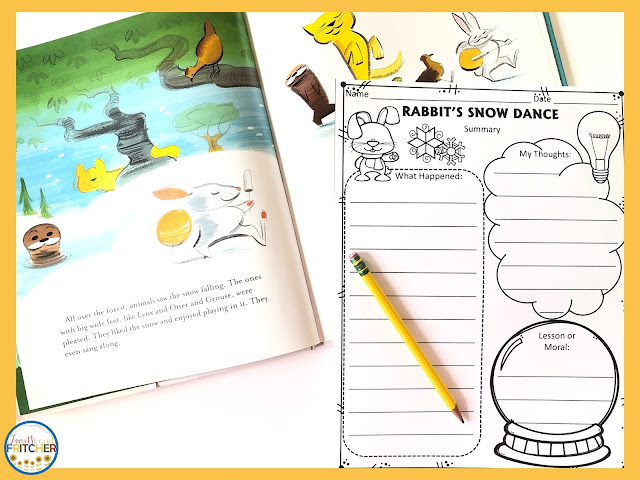
Rabbit's Snow Dance
Rabbit's Snow Dance; Summary Sheet

You can find find my print and go resource for Rabbit's Snow Dance HERE.

There are many read alouds for this picture book on the internet. Two options are listed below (the first link read aloud is more decorative with graphics and music, the second is a more direct and simplistic approach).

Read Aloud Rabbit's Snow Dance

Rabbit's Snow Dance


Other PRINT and Go Picture Book Resources:

American Revolutionary War Stories BUNDLE


Other Picture Book Blogs:


Easy Back to School Picture Books

Best Virtual Field Trips for Your Elementary Classroom

best virtual field trips

Once upon a time, field trips meant loading up the bus and heading to a museum or park for the day. But with today's technology, "field trips" have taken on a whole new dimension! Virtual field trips offer an opportunity for teachers to bring unique experiences to their students from the comfort of their own classroom. 

Listed below are some of the best virtual field trips on the web that offer plenty of choices and directly align with multiple science or social studies standards.

If you are looking for a way to get your students responding to what they  experienced, grab this FREEBIE set of digital response templates. Read about them here.

Teachers can choose from 3 different responses that will fit any field trip chosen! These responses offer maximum versatility to reach every learner in your classroom. 

response slides and templates

SCIENCE

Access Mars

The ultimate field trip- another planet! This engaging website allows students to explore the Red Planet as well as the rover, Curiosity.

Detroit Public TV Digital Adventures:

Great Lakes Now - Virtual Field Trips

360 Experiences Winged Creatures 

Grab a lesson plan and link (provided on the website) and take your students to various areas along the Great Lakes.

International Wolf Center

Whether you're seeking red or grey wolves, this website has you covered! The IWC offers a variety of distance learning opportunities as well as free or paid encounters. Click on the "programs" tab to see all of your options.

Lights Over Lapland

Click in and choose your frosty adventure! Stunning photos and beautifully edited videos give students a virtual experience from Sweden.

National Zoo Live Web Cams

Download the provided bingo cards and click through to some fun! 5 different webcams and 4 different bingo cards offer plenty of virtual fun for you and your students.

Nickelodeon - Slime in Space

This YouTube link will lead you and your students through slime experiments in space, vocabulary enrichment, as well as some Q & A.

San Diego Zoo Live Webcams

Choose your animal and click in to watch them live in their exhibit!

Son Doog Cave

Enjoy this amazing land structure in Vietam and enjoy the 360 degree view as well as the accompanying audio.

Stellarium Web

An interactive website that gives stydents options for exploring the night sky.


SOCIAL STUDIES

American Battlefield Trust 

Click and select a battlefield! These virtual tours of Civil War and American Revolution battlefields bring your students to historic spots and give them a 360 degree view.

Colonial Williamsburg Webcams

Explore eight different webcams and see what's happening at places like Market House or Raleigh Tavern.

Ellis Island

Walk the hallways that millions of immigrants moved through as they made their way to a new life in America. View the refurbished Great Hall as well as areas frozen in time such as the Hospital Wing and Staff Quarters. The 360 degree views, navigation map, and comment side bars will give your students a modern-day lens to a historic place in American history.

History View - American Revolution

Click in and watch reinactors demonstrate what happened at the Battle of Lexington and Concord. Commentary and visuals help students get a comprehensive understanding of "The Shot Heard Around the World". See everything History View offers here --> HistoryView.org

Museum of the American Revolutionary War (Distance Learning Link)

Along with an impressive virtual tour, the AmRev Museum also offers paid, live experiences for classrooms. 

National Constitution Center - Virtual Tour Exhibits

Choose from four different exhibits that offer 360 degree viewing, audio commentary, and zoom options.

National Constitution Center - Interactive Constitution

A brilliant website that gives students an opportunity to explore the process of drafting the Constitution as well as a closer look at the Civil War Amendments and the Susan B. Anthony Amendment.

Monticello

See Thomas Jefferson's estate in all it's glory. Monticello teamed up with Google to bring users a truly museum-like experience. Use the map or tale of contents to explore every inch of the home and grounds (incuding the Hemmings Cabin).

Mount Vernon

Tour the estate of our first president, George Washington! The clickable links lead students to 360 degree views, short texts about specific artifacts, stories, and videos.

National WW2 Museum (K-12 Distance Learning Link)

Offering a range of experiences, the National WW2 Museum is sure to have something that will fit your needs and budget. Video archives, webinars, and virtual and electronic field trip experiences are just a sampling of what they offer. Teachers can even explore their own professional development!

US Census Bureau - Home and Distance Learning Activities

A plethora of activities designed around the Census and statistics. This website offers educators lesson plans written in a classic format that includes grade level, time needed, and the location on Bloom's Taxonomy!

Smithsonian National Museum of Natural History

A virtual version of every exhibit. Bookmark and come back for more and more!

The Statue of Liberty

See Lady Liberty in all her glory. Multiple links will bring you to every inch of her magnificence; including some spots not included in the ticketed tour!

The Vatican Museum

Breathtaking 360 degree exhibits; includes the Sistine Chapel


Google Field Trips

The Great Barrier Reef 

Harriet Tubman

Ford's Theater

Google Voyager

Google has an amazing "grid". So, it's no surprise they have some amazing tools that offer your students up close and personal experiences around the globe. I have done a handful of the experiences in Google Voyager and the students absolutely love them. The interactive component of moving around the globe blended with factoids, informational text, short videos, and artifacts give the students a truly museum-like experience.

No matter what your budget or subject area might be, there is something out there for you and your students. Keep using key terms to search for the latest and greatest offerings. And, if you come across some really spectactular finds, let me know. I'll gladly add them to this list!

best virtual field trips

Easy Lesson Plans

easy lesson plans elementary classroom

I've written thousands upon thousands of lesson plans during my career. I've been at this game so long that when I started teaching we didn't list actual standards within our plans; we simply stated the goals and objectives. Alphanumeric standards weren't required or included. That all changed with the implementation of the Common Core and teacher evaluation systems.

Lesson plans today have taken on a life of their own. Along with standards, teachers are sometimes expected to incorporate other detailed components for every lesson: minute-to-minute time stamps, dialog, specialized questioning, accommondations/modifications, etc... Some lesson plan templates introduced to teacher candidates are 10 pages long! No one working in the trenches has the time to write (or read) a 10 page lesson plan. 

To balance out the simplistic lesson planning I used once upon a time with the overly-rigorous plans being introduced today, I suggest using the 4Ts. If you focus on the four Ts, you will have planned for all the major components of what makes a great lesson.

The 4 Ts are:
  • Target
  • Text
  • Task
  • Talk

Target

What is the standard? What is the ultimate goal for this lesson? That is your target. 

Granted, lessons can be crafted that work toward more than one standard. However, keep your eye on the one standard that is most important. It will help you zero in on the most critical aspects of your lesson.

Keep in mind that mastery of all standards is expected at the end of the school year. Thus, if your students are unable to perform at the proficient level at the beginning of the year - that is expected. My expectations for R4.1 in September are vastly different than in June.

If your district has designated "priority" or "focus" standards, incorporate them into your plans often. Create lesson plans that move the focus standards in and out of the spotlight of the lesson. They may not always be the main component of your lesson, but are always being worked toward.

Text

What are the students going to read/watch/examine? What is going to be the vehicle for the learning? That is the "text". 

Most of the time we use fiction and nonfiction passages to guide student learning. But, we know that there is a vast array of choices now. Perhaps you will be watching a BrainPop video or moving students through a NearPod. 

Delivering content is no longer reduced to turning to page 73 in a text book.

Are you dissecting owl pellets? Examining slides under a microscope? Designing and building STEM roller coasters? Whatever you use to deliver the content, think of that as the "text". 

Task

What is the expected outcome of your lesson? What are students expected to produce? What will you be looking at in order to determine the next lesson? That is the task.

Just as standards can move in and out of the "top spot" in lesson planning, so too can tasks. Realistically, there are several tasks we expect students to perfrom for any given lesson. Many expectations fall within executive function skills sets and oftentimes are not thought of at all. Organizational skills or computer savvy are sometimes taken for granted. 

However, if students do not have the organizational or computer skills required to fulfill the task, you may be setting up a scenario that leads to frustration for you and your students.

Build up the skill sets required for the ultimate task. Make certain you have explicitly taught your students how to move through a Nearpod before you expect them to navigate and respond to one independently. Ask yourself if your students know how to open and edit a Google Doc or Slide before you assign a task connected to using the technology.

Make a concerted effort to eliminate confusion about how to complete tasks before you expect independence with a task. We cannot expect students to demonstrate command of a standard if they are unable to navigate the tech to do so. A little planning and explicit teaching at the beginning will foster smoother and easier task completion later on.

Talk

Who will be doing the talking during your lesson? Who is sharing information? How will thoughts and ideas be communicated? What will the conversation look like? That is the talk. 

If the bulk of your plan involves only your voice, consider adding to the plan. As teachers we sometimes fall into the trap of being the only voice in a classroom. But, we know that students need time to speak to each other. Some of the best learning comes from their peers and the ability to flesh out their ideas as they learn new material and find ways to anchor their learning in their brains.

Aside from the usual speaking skills that educators typically think of when writing their plans, how else can your students "talk" with one another? In a digital world that might mean using Jamboards, polls, or shared Slides/Docs. Any vehicle that encourages students to share ideas with one another is a means for them to "talk"; the more vehicles for communicating, the better.

Make time in your lesson for students to communicate with each other. Move beyond the minimal "turn and talk" scenarios and truly consider how you can allocate a good chunk of the lesson to students digesting and discussing the material amongst themselves.

The Other Stuff

Within a 4T lesson plan are things such as the date, subject, materials, exit, etc... Those pieces are important too. However, if the bulk of your brain power is concentrated on the 4Ts you will have a carefully crafted lesson that will engage your learners and lead to mastery of the most challenging standards out there.

If you would like a free 4T lesson plan template click HERE.


easy lesson plans elementary classroom


Owl Moon Upper Elementary Literature Study


owl moon elementary literature study

I have used Owl Moon (the 1987 Caldecott winner by Jane Yolen) in my classroom the past few years. It is an excellent resource to help teach students many facets of author's craft; specifically figurative language!

Some may consider picture books too simple for upper elementary classrooms. However, some brilliant literature presented in a picture book format can lead your students to a deeper understanding of the elements of literature. Owl Moon is such a book. There are some excellent examples of simile, metaphor, and personificaiton in this picture book.

Yolen brings the reader through a unique encounter during the dead of winter. A young child heads out in the middle of the night to go owling with their pa. Told using a combination of figuative language and sensory details, along with visually stunning illustrations, readers are transported to a brisk winter night as the duo seek a Great Horned Owl. 

My Owl Moon literature study typically takes 5-8 days.

Before the Reading

Whether a picture book or a novel, I like to use a pre-reading probe and have students discuss a few different questions that relate to the book. With Owl Moon, I will only show the cover to the students - no flipping through the pages!

Discussion questions help get the students thinking about the plot or themes they will encounter in the book. A question such as: "What do you know about owling?" helps generate any ideas the students might have but it also prepares them for when they hear the word later on while listening to the book.

This is also a great time to review some figurative language. If you and your students have already worked with simile, metaphor, and personification, take a few minutes to go over these terms and remind students of how authors work them into a story and which key words to listen for.

During the Reading

For the first read, I do not show the illustrations. I ask students to close their eyes and allow Jane Yolen's words to create the pictures for them in their minds. I also ask them to listen for sensory details. At the end of the first reading, students take note on the sensory details. We share out and oftentimes will make an anchor chart of the details the students heard.

One optional activity I've done in the past is to ask students to choose the most detailed portion of the reading. During which part did they have the most vivid visualiztion? Then, they draw! To make it extra fun, I ask students to draw on blue construction paper using white chalk. 

Once students have had an opportunity to create their own visuals for the book, I will read it again. For the second reading, I show the illustrations and students will listen for the figurative language. Students will have been introduced or reviewed simile, metaphor, and personification prior to the second read. 

Option: you can show students a YouTube vidoe of this read aloud. The version linked below does not show the text- it gives students an opportunity to focus on the illustrations.

Read Aloud Version on YouTube (does not show text)

If it is the first time I have taught simile and metaphor, I break it up over two days. Simile the first day and metaphor the second. Using two days helps reduce the students' cognitive load and gives their brains an opportunity to "wire" the first term into their brains correctly before moving on to the second.

Teaching both terms in one day can confuse some learners. It's better to take the time and teach them on different days. Once the terms are incorrectly "wired" it can take significantly longer to correct the pathways.

Read more about cognitive load here --> Reducing Student Cognitive Load

During the second read, students take notes on the figurative language. This can be broken up in different ways: have students work in pairs/small groups, assign specific figurative language to students or groups, or ask students to focus on particular sections of the text. You may want to assign one group to simile, one group to metaphor, and one group to personification. Go over the figurative language and make anchor charts.

owl moon elementary figurative language

Once we have a list of the figurative language in the book, I like to have the students break down the language. What words does Yolen use and what is the message she is trying to convey? 

Students break this down using a simple chart labeled with "Figurative Language" and "Simple Language". This chart comes in handy later on when students are asked to transform their own writing from "simple" to "figurative". The chart can work both ways; start with the figurative and consider the simple. Or, start with simple and draft the figurative. 

owl moon elementary figurative language

Although the main focus of this unit is typically the figurative language, I also like to include lessons that strengthen comprehension, character study, and short (written) response. I use Evidence Charts and Character Mats to help students dig into the text and use text evidence to support their ideas. 

After the Reading

If I want to extend the students' learning, I have them write their own narrative. I give them the same organizers that we used to break down Yolen's story. The familiarity with the formats and how they can be used to organize and draft helps those students who struggle with writing tasks.

I start with asking students to think about a special experience they have had with another person. They then draft out the experience using a Begining-Middle-End chart. Once students have a good base to work from, they work toward revising their narrative using sensory details and figurative language. 

When I am leading my students into some complicated math algorithym I start will small numbers. I keep it simple so when the numbers get bigger, hopefully the algorithym has been learned and it's simply a matter of applying the same steps using bigger numbers. 

The same process can be used with picture books in upper elementary classrooms- shorter texts that give students a look at rich, beautifully crafted language and an opportunity to break down that text to fully understand how it enriches a story. Picture books can help students identify and practice the more complicated parts of our language and author's craft when the text is less intimidating; and Owl Moon is a perfect choice.

You can find everything you need to teach a literature study using Owl Moon in my TpT store here.


Free Figurative Language Resources

For FREE simile, metaphor, and personification printables for the book Owl Moon click here.


Click below to visit and explore other winter mentor texts!

You are invited to the Inlinkz link party!

Click here to enter
owl moon elementary literature study

Distance Learning: Creating a Structured Virtual Classroom


If there is one thing I've learned during my career, it's that students thrive in a structured environment. We know what can happen when the daily classroom schedule gets disrupted (or there is a lack of structure). This is especially true if you've worked with students who have special needs or particular diagnoses.

Now that we cannot control (or structure) the physical space our students are working from, it is up to us to create structure within the virtual classroom. Let me share with you how my team and I have done it...

DAILY MORNING ANNOUNCEMENTS

This cannot be stressed enough. The daily morning announcements help start the day. They give students a reason to get up, prepared, and logged in. In the event students do not make it to the live announcements, they have the option to start their day with the announcements on replay.

I get it. Starting a YouTube channel and prepping for morning announcements every. single. day. can seem like an overwhelming task. However, it is worth its weight in gold. Set aside your insecurities, face the challenge of learning the technology, and do it. 

TASK CHARTS

Our team provides Task Charts twice a week. On Monday students get a chart for Monday and Tuesday. They get a second set on Thursday for Thursday and Friday tasks.

Wednesdays have become official Catch Up days. Students receive a special Catch Up chart that lists the tasks from the previous 4 days. If students have all tasks completed, Wednesday can be a day of rest or an opportunity to explore other activities within our Google Classroom.

Students use these charts to organize their work. In their Google Classroom we provide one set they can edit and one set that is VIEW ONLY in the event they delete or lose the other one.

MEETUP SCHEDULES - BONUS ZOOMS

We are rolling into week 8 of distance learning. We have a pretty consistent meetup schedule. The students have the schedule uploaded into their classroom each week so they know the times and topics for the week.

My team and I rotate the responsibility and hosting for that slot. It is a time when students can click in and learn more about a specific topic. Each week has a theme. Last week we highlighted Mathematicians, next week we will be talking about Leaders in the Women's Suffrage Movement. Other topics have been: Important Places in New York During the Revolutionary War, the 3 Branches of Government.

The format is always the same. We use a 5 Ws approach. Keeping the format the same helps provide that bit of structure for the students as they listen and learn about a new topic. After the meetup, we post the slides with details and pictures into Google Classroom to give our students an opportunity to read through the material again. We sometimes provide links to other related resources (articles, YouTube videos) the students might enjoy.


MEETUP SCHEDULES - SOCIAL ZOOMS

The social meetup is more popular than the Bonus Zoom slot. But that's no surprise because this is the time of the day when we play a game, do some directed drawing, or hold dance parties and singalongs! This time is designated for connecting socially with our students. 


Dance Parties have been happening on Fridays. My teammate puts together a playlist within her YouTube channel and while we are all linked into the Zoom, one person screen shares the video and another one plays Ryan Seacrest. The more popular videos are the ones where students can watch lyrics (ala karaoke style) or the videos where players have recorded themselves playing a dance game and posted their performance for others to watch. Students are getting more comfortable with getting up and dancing along with the videos. We've even started to take requests. Anyone have a good link to Bohemian Rhapsody?


You can make your dance party even more fun by choosing a theme and dressing up.
80s Dance Party!

MEETUP SCHEDULES - BOOK CLUBS

We are about to start a novel. We are adding a meetup to our schedule to help students get through the material and provide structured support. We won't be using the same platform (Zoom) and will be moving to Google Classroom Meet due to better audio capabilities. In the meetup schedule, students will see that it is in a different place. The schedule is color-coded to emphasize the change.

Generally speaking, all of our meetups have been in Zoom. We post the schedule on Monday so the students know when and where to show up and what the topic will be. Keeping the same schedule in place helps with structuring your meetups and giving students a sense of familiarity. They can expect a meetup at the given times. It's a small structure that goes a long way in creating a predictable environment.

SPIRIT WEEKS

Who doesn't love a great Spirit Week? These rare special weeks in a physical classroom can happen every week in the virtual one! Our school is a Positivity Project School, so for the past couple of weeks we have been combining our spirit weeks to the 24 strengths. Again, using a theme, we match up the daily spirit to a strength within the program and present students with a challenge to practice that strength. Last week was Disney-themed, next week will be Star Wars!
Disney Week!
Students who dress or complete the challenge are encouraged to snap a pic and share it. We recognize the student for their efforts by posting the pic in our social classroom: the Fourth Grade Forum.

ACADEMICS

Just with your physical classroom, a structured approach to academics is important in the virtual classroom, too. You can create a structure with academics in different ways.

When Assignments Are Posted
The expectation has been made that math and literacy are "every day" (sans Catch Up Wednesdays). Social Studies lessons are on Mondays and Thursdays, Science lessons are on Tuesday and Fridays.

Where Assignments Can Be Found
We have specific Google Classrooms for each subject area. Within the subject area we have been using "Topics" to keep the content organized. If you have just one Classroom where you are loading everything all together, I strongly recommend you start using "topics" to organize the material and lessons.

Use Due Dates
When you assign a due date it syncs in Google Classroom to show up on the left side of the student's dashboard in the "Upcoming" area when they log in. Using due dates helps the students know what is expected for work and when it is due. It becomes a "to do" list for the student. It is a nice alternative if students don't have Task Charts. Although my team and I use due dates, we accept work at any point. The purpose and function of due dates is to provide structure and a plan for organizing work completion.

Number Your Assignments or Use Dates in the Title
When you prepare a lesson for Google Classroom, you need to type in a title. My teammate has been numbering and dating the math assignments - "Math Assignment #24 - Tuesday 4/28". In Literacy and Content we have been using the date and topic of the assignment - "April 30: Around America to Win the Vote" "May 1: Teeth Brushing".

Using either numbered assignments or dates helps both you and the students/families. When we have had to navigate parents through their child's classroom to determine what work needs to be completed, it has been very helpful to use the titles to indicate what is done and what needs to be done. Although there are other places for students and families to locate and track work in Google Classroom, this simple system has proven to be a life boat for parents trying to navigate these choppy waters.

Keep Your Instructions Consistent
When typing in directions for assignments, we stick to basics. We number the steps needed to complete a lesson. We also let students know if materials needed are linked below the instructions or are already within the students' Drives.

As I was leading my students through a digital notebook we had started before quarantine, I set up the instructions in two parts and used capital letters to differentiate what students needed for the assignment and what tasks they needed to complete.

GOOGLE CLASSROOM INSTRUCTIONS EXAMPLE

YOU WILL NEED THE FOLLOWING:
SAP: Slides 27 & 28 (already in your Drive)
Screencast (linked below)
Video: History Brief: The Second Continental Congress (linked below)
Video: History Brief: Fort Ticonderoga and the Battle of Bunker Hill (linked below)

TASKS TO COMPLETE:
Watch the Screencast
Watch the Videos
Fill in SAP Slides 27 & 28

Keep Students' Responses Similar
Now is not the time to try something brand new or overly complicated. Stick with responses students are familiar with and have had practice completing. Three of the go-to responses my team uses are 3-2-1s, Memory Boxes, and 5 Square Organizers. From the student perspective it gives students an opportunity to demonstrate their learning in a unique way without the panic of answering incorrectly. From the teacher perspective, it takes minimal time to bring the slide up and quickly assess the student response. 

These 3 responses work with just about any lesson or content. They are highly adaptable and help students keep their cognitive load on responding to the material rather than figuring out the expectations of the response.

So easy-to-use! Go digital today!


You can get your own copies of these easy-to-use Response Slides (plus 2 other Slides for Reading Response!) when you subscribe to my email list. Click the graphic below and join today!


As we continue to adjust to this new way of learning, a structured system is more important than ever before. It's never too late to start! Just as we adjust things in a physical classroom, you can do the same in your virtual classroom. Find one way to structure your virtual classroom. When it feels natural and well-understood, add another structure. My team's virtual classrooms did not have this much structure 8 weeks ago; I imagine there will be additional adjustments as we work toward the end of the school year. Start adding structure tomorrow - you won't be sorry!